
“Once I matched the head angle between photos, the swap stopped looking “pasted on” and became usable.”
NoraContent creator
Upload a clear face photo and a target image, generate a natural-looking swap, and export a share-ready result. This page focuses on clean inputs, realistic limits, and fast iterations—no manual masking required.
People search ai face swap online because they want a quick, believable replacement that works for real photos: portraits, thumbnails, comps, and creative edits. This page is designed around practical outcomes—how to choose better inputs, when a swap will look natural, and when it will not—so you can decide fast and avoid endless retries.
Try AI face swap online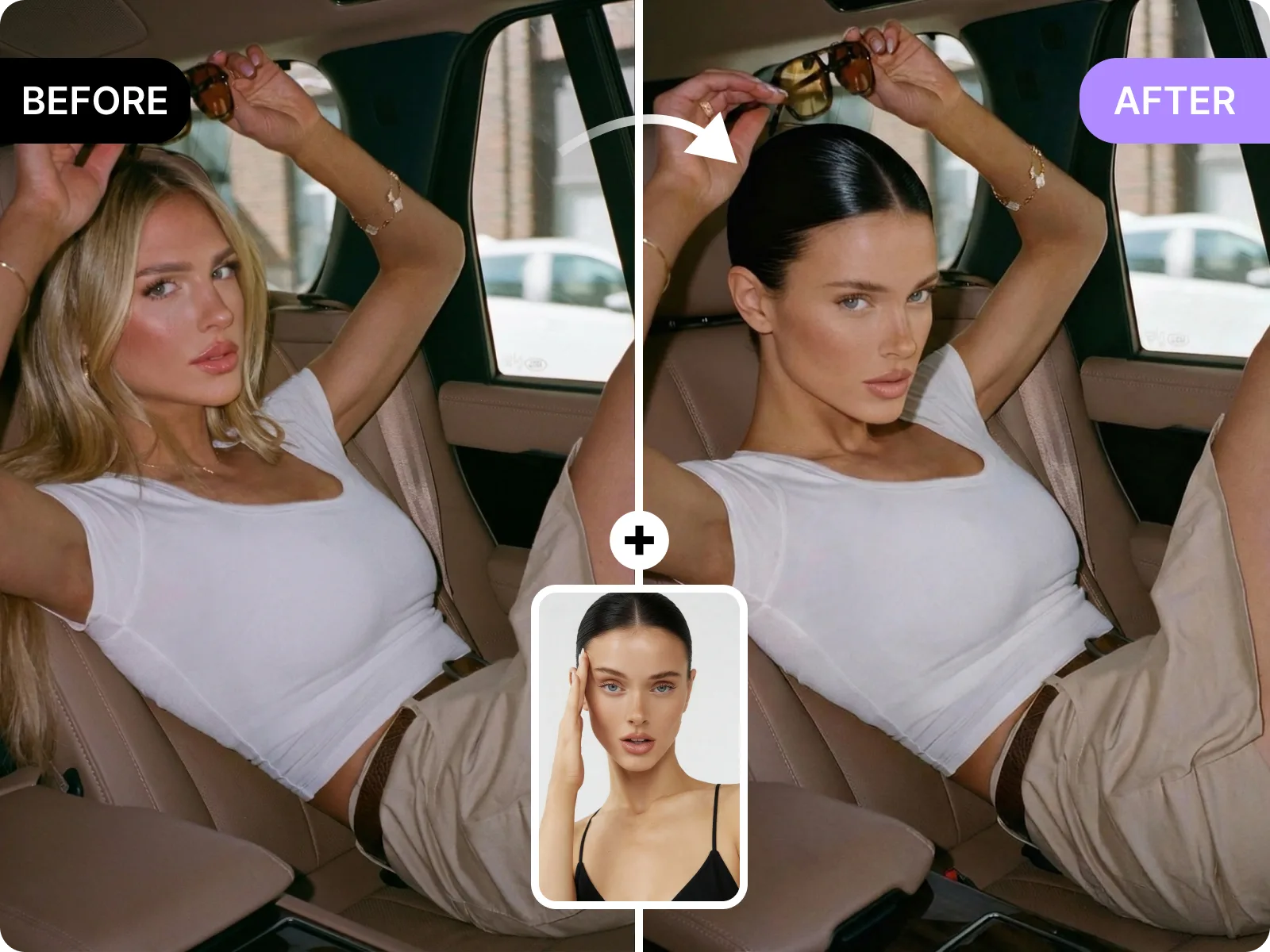
A good face swap keeps the source identity cues people actually notice—eye spacing, nose shape, and overall facial structure—while adapting to the target photo’s pose and lighting. You get the most believable results when the source face is sharp and front-facing, and the target face is not heavily turned away from the camera. If you see “floating face” artifacts, it is usually not a settings problem. It is an input problem: low resolution, strong filters, harsh backlight, or a big pose mismatch. Fixing the inputs is faster than trying to force a bad pair of photos to work.
Swap a face nowMost manual workflows fail around the same places: hairline, jawline, cheeks, and areas with strong shadow. This AI face swap online flow is best when the target face is unobstructed (no hands covering the mouth, no sunglasses glare, minimal hair crossing the eyes). You can increase your success rate by using even light, avoiding beauty filters that change skin texture, and picking a target image with softer shadows. When you start with cleaner edges, you spend less time retouching and more time choosing the best variation.
Improve the blendIf you make content, speed matters. AI face swap online helps you explore thumbnail concepts, character mockups, and creative comps without reopening the camera. The best workflow is to generate a small set: try a few target photos with similar lighting, keep the strongest two or three, then export for review. This is especially useful when you need to test a concept quickly, get feedback from a team, or decide what to shoot for real. The goal is not endless generation. The goal is one result that is good enough to move forward.
Create variationsAn honest ai face swap online tool has boundaries. It is not ideal for multi-face group shots, extreme side profiles, heavy motion blur, or faces covered by masks and hands. It also should be used responsibly: only swap with consent, and do not use outputs to mislead people about identity, endorsements, or events. If the context could confuse viewers, label the result as edited or AI-generated. When you stay within these limits, you get faster, cleaner results and fewer situations where the output becomes risky or unusable.
Try a safe use caseUpload a source face and a target photo, then generate a natural-looking face swap online that respects head pose and lighting. No install and no complex editing—just a clean result you can export and use.
Try AI face swap onlineThis tool is good at single-person portraits with clear eyes, sharp focus, and similar angles between source and target. It is NOT ideal for crowded group photos, extreme profiles, heavy occlusions, or strong lens distortion. If your first result looks off, switch to a cleaner target image before you regenerate.
Pick a better target photoAI face swap online is useful when you need a fast decision: test a thumbnail idea, mock up a character concept, or preview a creative direction. Generate a few variations, pick the most believable one, and export for sharing or review without spending hours on manual masking.
Generate variationsTraditional face replacement often requires careful masking, warping, and color correction. Here, you usually get a better result by improving the input pair: sharper source face, cleaner target photo, and closer lighting. Iteration on inputs is faster than fixing artifacts after the fact.
Create a clean swapMost visitors want speed plus believability. These testimonials reflect a practical workflow: start with cleaner inputs, generate a few options, and export the one that looks natural enough to use.
“Once I matched the head angle between photos, the swap stopped looking “pasted on” and became usable.”
“Fast iterations are the main value. I can try three targets and pick the most natural one in minutes.”
“It is helpful for mockups because it is quick. I do not need a full editor just to test an idea.”
“Once I matched the head angle between photos, the swap stopped looking “pasted on” and became usable.”
“Fast iterations are the main value. I can try three targets and pick the most natural one in minutes.”
“It is helpful for mockups because it is quick. I do not need a full editor just to test an idea.”
“We use it for thumbnail comps. It helps us decide what to shoot before we spend time on a full edit.”
“The export is good enough for internal approvals, so we do final polish only after we pick a direction.”
“The page sets boundaries clearly, which makes it easier to use responsibly and avoid misleading edits.”
“We use it for thumbnail comps. It helps us decide what to shoot before we spend time on a full edit.”
“The export is good enough for internal approvals, so we do final polish only after we pick a direction.”
“The page sets boundaries clearly, which makes it easier to use responsibly and avoid misleading edits.”
“The input rules saved me from wasting time on side profiles that were never going to look right.”
“Cleaner source faces made the biggest difference. Using a sharper selfie improved realism immediately.”
“For single-person portraits, the results are consistent. Group photos are where it breaks down, as expected.”
“The input rules saved me from wasting time on side profiles that were never going to look right.”
“Cleaner source faces made the biggest difference. Using a sharper selfie improved realism immediately.”
“For single-person portraits, the results are consistent. Group photos are where it breaks down, as expected.”
Upload a clear source face
Choose a sharp, well-lit face photo with visible eyes and minimal glare. The tool uses this image to capture identity cues. If your source is blurry, heavily filtered, or partially covered by hair or sunglasses, the swap will usually look less natural.
Upload your target photo
Pick the image where you want the face to appear. For the most believable AI face swap online result, use a target with a similar head angle and lighting direction to your source. Single-person targets are the most reliable, especially when the face is unobstructed.
Generate and export
Generate the swap and check edges around the hairline and jawline. If something feels off, change the source or target photo and regenerate. Once it looks natural, export a high-resolution file for thumbnails, comps, or sharing.
Upload a clear face photo and a target image, generate a natural-looking swap, and export a share-ready result. This page focuses on clean inputs, realistic limits, and fast iterations—no manual masking required.