“I match hair to moodboards before a shoot and send clients three options—way fewer on-set surprises.”
Alex M.Art director
Upload one front-facing photo, describe the cut or tap presets, and see natural-looking before/after results without watermarks.
The AI hairstyle generator is built to let you preview cut and color decisions on your own face instead of guessing from references. Upload one clear, front-facing portrait and the AI hairstyle generator applies the keywords you provide—length, bangs, layers, balayage tones, or highlights—to create multiple before/after sets that keep your skin tone, hairline, and lighting aligned. You can share those side-by-side results with stylists, teammates, or friends in minutes to validate direction before a shoot, an ad campaign, or a salon appointment. Because the AI hairstyle generator runs in the browser and exports in the ratios you need, it replaces reshoots, reduces back-and-forth on color swatches, and prevents costly mistakes when you are on a tight timeline.
Start with your photo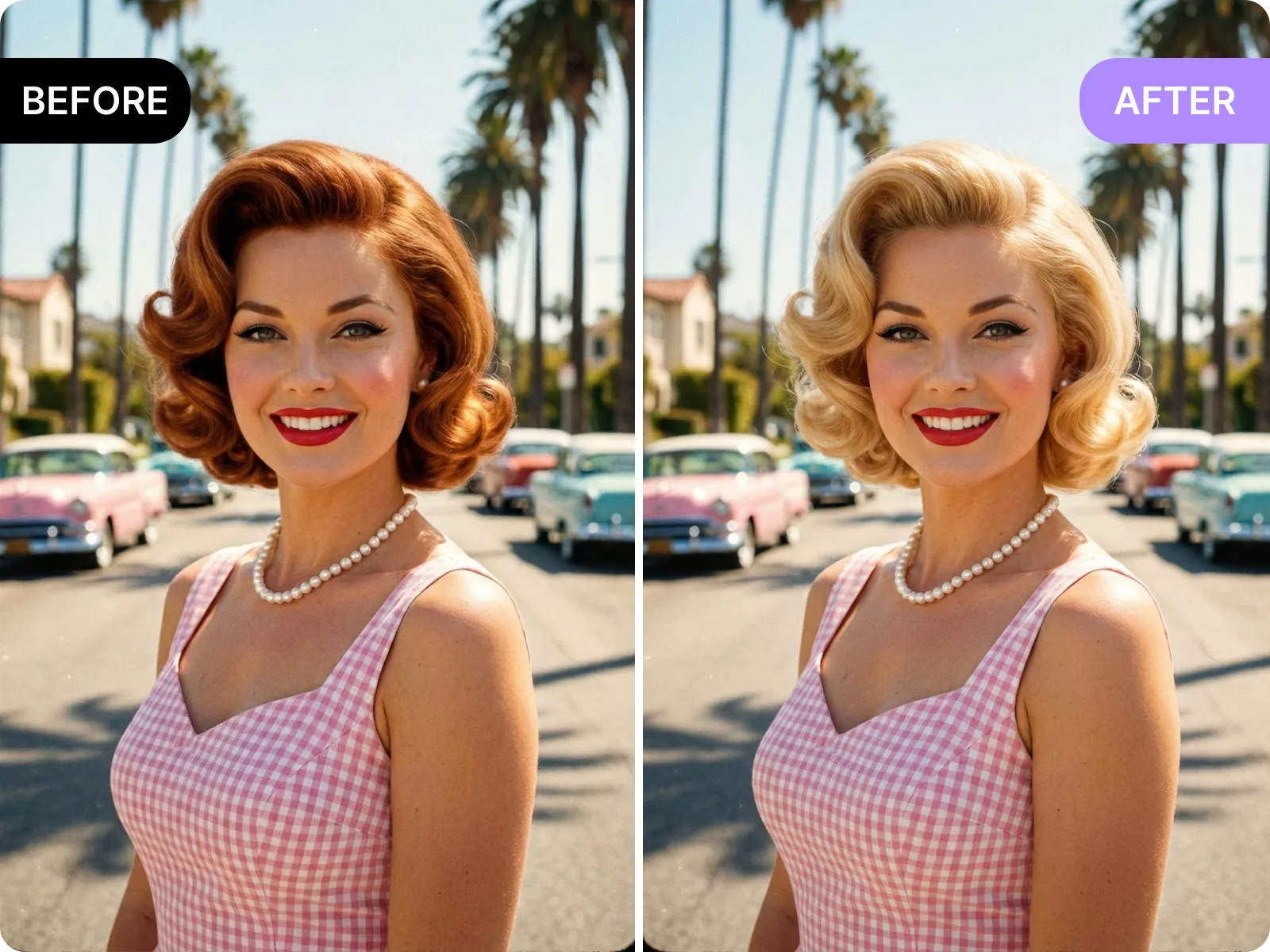
The AI hairstyle generator helps creators test hair color and cut ideas directly on cover assets without recalling talent. Upload a face-forward photo, type a prompt like “milk tea brown waves” or tap the “French bangs bob” preset, and the AI hairstyle generator will output multiple watermark-free before/after images with skin tone, hairline, and shadow alignment intact. Drop 1:1 or 9:16 variants into YouTube, TikTok, or Instagram thumbnail A/B tests to see which look lifts CTR while preserving your original artwork. Keep the raw upload, compare several hairstyles, and shift directions instantly instead of scheduling another shoot or relying on heavy manual retouching.
Try a new lookUse the AI hairstyle generator to prepare three consultation packs before a booking so clients see length, fringe shape, highlight placement, or hand-painted color choices clearly. Upload a clear portrait and create side-by-side comparisons such as “long layers + milk brown,” “shoulder-length bob + matte ash,” or “medium waves + copper-gold highlights,” adding notes about lighting, tone, and maintenance. Clients understand color shifts and layer positions upfront, while stylists avoid on-site surprises and can focus the appointment on the approved plan. Because the AI hairstyle generator exports clean before/after sets, you can message them for confirmation, align expectations, and reduce costly redos or miscommunications.
Send optionsIndividuals can use the AI hairstyle generator to trial bob cuts, French bangs, shag or wolf cuts, hand-painted balayage, or ombré gradients in one session and export 1:1, 4:5, or 9:16 for instant sharing. The AI hairstyle generator keeps face shape, skin tone, and hairline consistent so you see a realistic preview before paying for a color or perm. Share several looks with friends, run a quick poll, and decide on the right length, fringe, and tone without impulse spending or the risk of needing a corrective visit. Saving multiple versions helps you and your stylist lock in the exact direction while saving time and avoiding buyer’s remorse.
Export a poll imageThe AI hairstyle generator is built for speed, accuracy, and real-world use. Upload a single, evenly lit, front-facing portrait, type prompts like “long layers copper with curtain bangs” or “shoulder-length blunt bob in deep ash,” and receive multiple aligned before/after sets in seconds. The AI hairstyle generator keeps your skin tone, hairline, and shadow direction consistent so results feel like a mirror, not a sticker. You can validate looks for a cover, ad, or pitch without reshooting talent and choose a color plan without guessing from swatches. When timing is tight, the AI hairstyle generator becomes the fastest way to see credible options before committing.
Generate nowThe AI hairstyle generator supports detailed prompts and curated presets so you can move at your own speed. Spell out length, texture, fringe shape, layers, tone, and style vibe—such as “sleek bob with blunt bangs, soft brown, clean editorial”—or simply tap presets like straight-with-full-bangs, layered wolf cut, or deep brown to caramel ombré. The AI hairstyle generator locks face proportions, cheekbone lines, and skin tone as it applies the hair change, reducing the pasted-on look and avoiding blurred edges. It returns several variations, letting you pick the most natural, on-brand option for thumbnails, social posts, or salon references without guesswork.
Guide it with a promptThe AI hairstyle generator performs best on single-person, front-facing portraits with even lighting so it can preserve hairlines and skin tone precisely. Profile angles, harsh overhead shots, busy backgrounds, hats, heavy filters, or bangs covering the face can introduce edge drift or color bleed. For the cleanest output, shoot in soft indoor light, keep the top of the head and ears visible, avoid backlight or overexposure, and use minimal beautify filters. That way the AI hairstyle generator can render smooth color transitions and detailed strands, giving you export-ready comparisons that hold up in covers, ads, or salon consultations without manual cleanup.
See best practicesThe AI hairstyle generator exports 1:1, 4:5, and 9:16 with original-versus-generated comparisons so you can swap looks instantly in thumbnails, ads, or polls. Try deep brown, caramel, copper-gold, or milk tea shades and alternate between long, short, layered, and fringe combinations within minutes—no salon swatches, recoloring, or reshoots required. Every output from the AI hairstyle generator is watermark-free and ready for commercial decks, campaigns, or social tests, cutting down on manual retouching and saving budget that would be spent on location resets or corrective color.
Export cleanThe AI hairstyle generator is used repeatedly by designers, colorists, and marketing teams who need to validate style, tone, and brand fit quickly while keeping assets clean and on-spec. By uploading real headshots and generating batch before/after sets, they collect feedback before pitches, covers, or ads go live, reducing on-set changes and reshoot risks. This section shares real experiences from teams that rely on the AI hairstyle generator for creative reviews, salon consultations, and ad A/B tests so you can judge whether its export quality, speed, and watermark-free outputs match your workflow and deadlines.
“I match hair to moodboards before a shoot and send clients three options—way fewer on-set surprises.”
“I match hair to moodboards before a shoot and send clients three options—way fewer on-set surprises.”
“Clients pick a tone in advance; I know whether copper or caramel will feel right before opening the dye.”
“Clients pick a tone in advance; I know whether copper or caramel will feel right before opening the dye.”
“We A/B test thumbnails with new hair colors without calling talent back—CTR lifts without extra shoots.”
“We A/B test thumbnails with new hair colors without calling talent back—CTR lifts without extra shoots.”
Upload a clear portrait
The AI hairstyle generator depends on a clean source photo to render accurately. Choose a single-person, front-facing or slight three-quarter portrait with even lighting, visible hairline, and no harsh filters. Keep the top of the head and ears in frame, avoid hats, heavy bangs covering the face, or hands blocking the hairline, and dial beautify effects down so skin tone and shadows stay real. A simple wall or soft indoor light works best; skip strong backlight or clutter that confuses edges. This lets the AI hairstyle generator produce crisp strands, natural color transitions, and exportable before/after sets that are ready for covers, ads, or salon discussions without extra editing.
Write a prompt or tap a preset
Inside the AI hairstyle generator, you can enter a full prompt—such as “shoulder-length bob, airy bangs, matte milk tea brown, soft Korean vibe”—or simply tap presets like bob, shag/wolf cut, or hand-painted balayage to move fast. Strong prompts include length, fringe shape, layers, curl pattern, shade, and mood; avoid vague words like “cool” or “pretty” alone. Presets speed up first results, while prompts give you precision. After the AI hairstyle generator returns options, refine phrasing or simplify if edges drift so the tool keeps outputting stable, on-brief hairstyles.
Generate and compare variants
After you hit generate, the AI hairstyle generator returns multiple before/after comparisons that keep your face and skin tone consistent while applying the chosen cut and color to the hair region. Review each image closely for strand edges, color transitions, and lighting direction, deleting any variants with artifacts or floating hair. If you notice tone drift or awkward layering, re-run with simpler wording. Keep two to three of the strongest outputs so you can drop them into covers, ads, or salon chats and converge on the right hairstyle quickly without sorting through dozens of edits.
Export in the ratio you need
When you are satisfied, choose 1:1, 4:5, or 9:16 inside the AI hairstyle generator to match Instagram, TikTok, YouTube covers, ads, or salon consultation layouts. Every export is watermark-free and ships with an original-versus-generated view for easy client review, polling, or deck placement. If you need more tweaks, regenerate with different shades or layering directions, then save the best set as ready-to-use assets. This keeps your workflow lean, avoids manual compositing, and reduces the time and cost of testing colors in person.
Upload one front-facing photo, describe the cut or tap presets, and see natural-looking before/after results without watermarks.
Drag & drop Image here