“I test different intensity levels to see what fits the campaign. It saves me hours of Photoshop.”
ElenaFitness creator
Use the muscle-up tool to enhance curves, highlight muscles, and keep the original pose and lightning intact. Upload a single photo, review the previews, and export a high-res result ready for social, marketing, or portfolio updates.
Everyone searching “ai muscle generator” wants one thing: a realistic, quick edge on their physique visuals. Instead of starting from scratch, focus on clean inputs, consistent lighting, and a small set of target muscles. This page explains what works, what to avoid, and how to keep the output believable so you can publish without tweaking every pixel.
Try AI muscle generator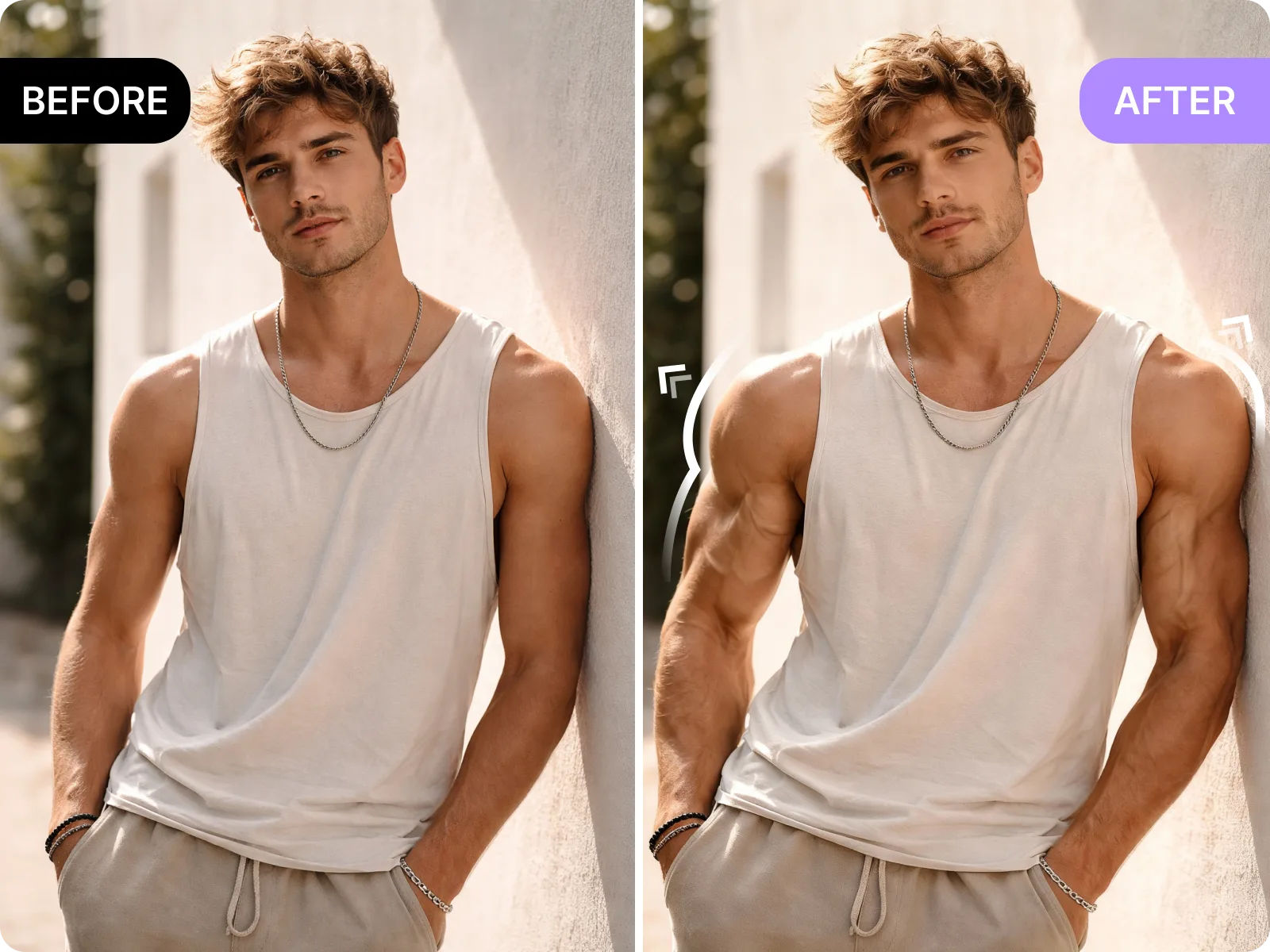
The muscle-up tool keeps your original stance and lighting while sharpening muscles so results look like a natural progression, not a fantasy edit. For the most convincing swap, use a high-res photo with even light and detached background—this avoids soft edges and keeps volume in the right places.
Enhance definitionUse the AI muscle generator to fine-tune your physique for posts, reels, and stories that demand higher follower engagement. A consistent, defined silhouette signals confidence, increases watch time, and makes callouts for fitness tips or collaborations more clickable. Generate versions with slightly different intensity, pair them with strong captions, and let the analytics show whether the sharper pic wins the higher click-through or comment count.
Boost social engagementA polished muscle-enhancement photo helps you stand out on dating profiles by highlighting muscular definition while keeping the rest of the scene real. Focus on a clean, even-lit shot and let the AI emphasize shoulders, arms, or abs without exaggerating. The result looks intentional and confident, increasing matches and message replies because your photos look sharper without feeling fake.
Elevate dating photosIt is honest about what it cannot do: transparent muscle overlays, extremely low-light photos, and body doubles still need heavy retouching. Use it for realistic enhancements—think sharper separation, better tone, clean midsection definition. If you push too far, the anatomically wrong shapes become obvious instead of flattering.
Try a natural editUpload a photo, enhance quadriceps, abs, or arms, and export a sharp result that retains your original pose. No manual masks, no reshoots—just a polished version that stays true to the physique.
Enhance your photoThe best muscle enhancements start with clean lighting, full body visibility, and a neutral expression. If the photo is too dark, blurry, or heavily filtered, the tool will exaggerate the noise. Choose images where muscles are already visible—this is about sharpening what exists, not inventing new anatomy.
Upload clean photoA well-defined physique draws more attention on your feeds. Use the AI muscle generator to deliver a consistent energy across thumbnails, cover photos, or tutorials, helping you raise follower counts and interactions without manual compositing.
Level up your socialsDating photos should feel like the best version of you. Sharpen muscle definition while keeping the original lighting and scene intact so you look believable, composed, and ready for real-world matches.
Enhance your dating shotsManual muscle retouching can take hours in an editor. Here, the fastest path to better definition is iteration on inputs: upload a sharper photo, keep lighting consistent, and generate a few intensity levels. Choose the natural-looking version, then export for review.
Generate a quick editFitness creators, dating prospects, and social storytellers want believable muscle definition that raises engagement and confidence. These testimonials highlight how the tool keeps it natural, consistent, and ready for social or dating launches.
“I test different intensity levels to see what fits the campaign. It saves me hours of Photoshop.”
“Iteration is fast. Upload, generate, review, and keep the cleanest one for the grid.”
“Exporting a result that looks natural enough to share with the client used to take a whole day. Now it takes minutes.”
“The muscle-up view helps me decide before I commit to a new shoot.”
“I test different intensity levels to see what fits the campaign. It saves me hours of Photoshop.”
“Iteration is fast. Upload, generate, review, and keep the cleanest one for the grid.”
“Exporting a result that looks natural enough to share with the client used to take a whole day. Now it takes minutes.”
“The muscle-up view helps me decide before I commit to a new shoot.”
“Keeping the same pose across shots is the key. The tool just sharpens the muscles, not the expression.”
“My story views jumped after I refreshed thumbnails with cleaner muscle definition and sharper lighting.”
“We run six images per month, and they all stay in the same tone thanks to this tool.”
“Keeping the same pose across shots is the key. The tool just sharpens the muscles, not the expression.”
“My story views jumped after I refreshed thumbnails with cleaner muscle definition and sharper lighting.”
“We run six images per month, and they all stay in the same tone thanks to this tool.”
“We use it for product mockups—the results are consistent, so the set looks like a deliberate series.”
“It sets expectations: if the lighting is off, the tool tells you by showing noise. That saves me from pushing a bad photo.”
“I love that it is honest about what it does not fix—no fake anatomy, just cleaner definition.”
“We use it for product mockups—the results are consistent, so the set looks like a deliberate series.”
“It sets expectations: if the lighting is off, the tool tells you by showing noise. That saves me from pushing a bad photo.”
“I love that it is honest about what it does not fix—no fake anatomy, just cleaner definition.”
Upload a well-lit photo
Choose a high-resolution photo where your muscles are visible. Even lighting and a clean background help the model distinguish contours and tighten edges without exaggerating noise.
Select the intensity
Pick how much definition you want for abs, arms, or shoulders. Start gentle—too much intensity can make the edit look artificial. Adjust the sliders, compare the previews, and keep the version that still feels like you.
Generate and export
Once the muscle definition looks natural, export a high-resolution file for social, campaigns, or client reviews. If the result highlights halos, switch to a cleaner photo or a softer target lighting before regenerating.
Use the muscle-up tool to enhance curves, highlight muscles, and keep the original pose and lightning intact. Upload a single photo, review the previews, and export a high-res result ready for social, marketing, or portfolio updates.
Drag & drop Image here