
All formats / Street Interview
From this reference
to our finished ad.
A supermarket interview for a language app became a supermarket interview for PostPlus. We kept the conversation structure and changed the problem, the person, and the product.
Need to connect first? Set up PostPlus in Claude or ChatGPT.
1. Find a reference
that fits your product.
You don’t need to invent a street interview from an empty page. Start with a conversation where the question leads naturally to the problem your app solves.
Tell PostPlus your product, your audience, and the kind of interview you’re looking for. It can search TikTok, Instagram, and Meta ads and bring the results back into the chat, so you can review the videos without opening a tab for every competitor.
Try this prompt
If PostPlus is not available in this chat yet, first help me connect it in Claude or ChatGPT using the setup instructions at https://postplus.io/formats/street-interview#connect-postplus and the connector URL https://mcp.postplus.io/mcp. Once it is available, continue with the task below.

Find street interview video references for my app, [app name or website].
My audience is [who uses it]. The problem it solves is [specific problem].

Search TikTok, Instagram, and Meta ads. Return the original links and explain which question, conversation, or product demonstration could be adapted for my app.
Keep organic videos and paid ads identifiable in the results. @PostPlus
What we chose for this case
We found a supermarket interview on streetinterview.io. The interviewer asks how quickly someone learned a language. Her answer gives the interviewer a reason to ask how she did it. The app enters through that follow-up.
That gave us something useful to adapt: an unexpected result, a skeptical question, and a product explanation the other person has asked to hear. For PostPlus, the unexpected result became finishing the week’s creative strategy by Tuesday.
See how we found the original reference
Google and agency portfolios are another place to find a format to study. Copy the video link when you’ve chosen one.
2. Understand what happens
before you rewrite it.
Paste the reference link into the same chat. Ask for the original details and full script first. “Make something like this” leaves too much of the conversation unexplained.
You want to see the opening question, the answer that creates curiosity, each follow-up, the point where the product enters, and the closing action. Also look at who holds the microphone, where the person looks, and what they do while answering.
Try this prompt
If PostPlus is not available in this chat yet, first help me connect it in Claude or ChatGPT using the setup instructions at https://postplus.io/formats/street-interview#connect-postplus and the connector URL https://mcp.postplus.io/mcp. Once it is available, continue with the task below.

Help me analyze the content structure of this video:
https://streetinterview.io/wp-content/uploads/2025/06/case_1.mp4

I want to know its original details and the full script, and then return the analysis report to me. @PostPlus
Read the sequence, not just the hook
In this reference, the result comes first. The interviewer questions it, the woman explains her method, and the app demonstration makes that method visible. The benefits and closing offer follow.
The useful part is the order of the questions. If you introduce your app before anyone is curious about the answer, you change the reason the conversation works.
| Conversation beat | Language-app reference | Our PostPlus version |
|---|---|---|
| Unexpected result | Learning French in three months. | Finishing the week’s creative strategy by Tuesday. |
| Follow-up | Questions about how she learned. | “Doesn’t competitor research take forever?” |
| New method | The app becomes the explanation. | Find a reference, analyze it, then adapt it with PostPlus. |
| Show the product | The language app appears on screen. | Real research results, the analysis, and the brand kit. |
3. Give the conversation
a reason to be about your app.
Give PostPlus your website or brand kit, the audience you’re selling to, and the specific problem you want to explain. A product name alone is not enough to write the exchange.
Our idea was simple: an agency girl is already buying snacks for happy hour on a Tuesday because her creative strategy is finished. The interviewer’s disbelief opens a conversation about the work she used to do across 20 tabs.
That makes research, analysis, and adapting references part of one explanation. We don’t need her to stop the conversation and recite every PostPlus feature.
Adapt the idea for your brand
If PostPlus is not available in this chat yet, first help me connect it in Claude or ChatGPT using the setup instructions at https://postplus.io/formats/street-interview#connect-postplus and the connector URL https://mcp.postplus.io/mcp. Once it is available, continue with the task below.

Here is a creative idea for PostPlus:
An agency girl has already finished her week's creative strategy by Tuesday. She's shopping for snacks in a supermarket before happy hour. An interviewer asks why she isn't working, and she explains how she uses PostPlus.

Audience: agency creatives, campaign managers, and AI startup teams.
Problem: jumping between 20 tabs to research competitors, save ads, and take notes.
Product: PostPlus helps you find references across TikTok, Instagram, and Meta, analyze their structure, and adapt them using your brand kit, audience, and selling points inside Claude or ChatGPT.

Use the reference video's content structure, framing, tone, pacing, narrative flow, and UGC aesthetic. Build curiosity about how she finished early before introducing PostPlus.
Write the full interviewer/interviewee exchange and mark where real product screen recordings should appear.

For my own app, replace these product facts and audience with the information I provide. @PostPlus
Choose the person and the setting
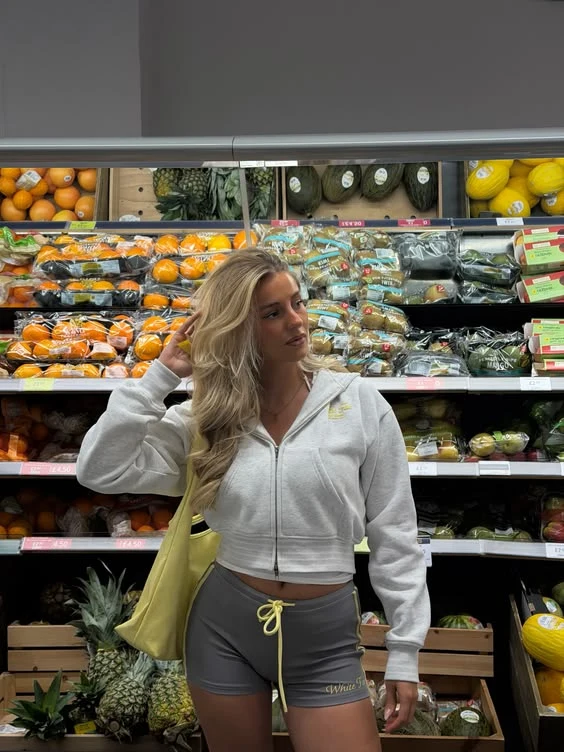
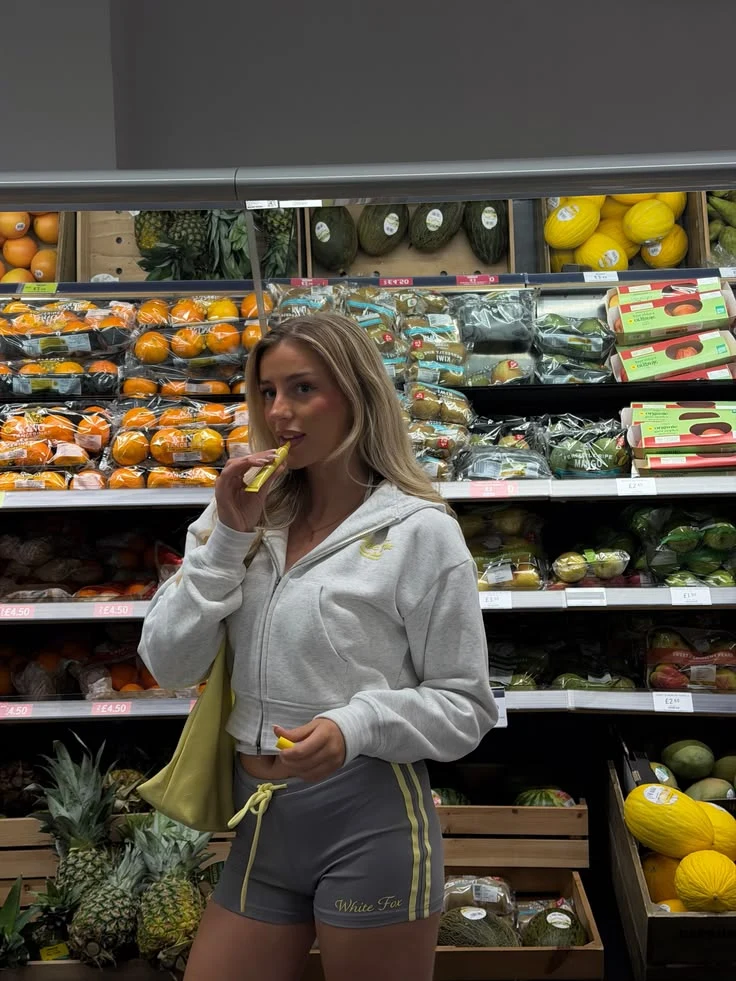
We supplied these two images for the woman, her outfit, and the supermarket. The gray zip-up, yellow bag, snack in her hand, and produce shelves give the generation a consistent scene to work from.
Before generating, read the questions out loud
Can you follow why each question comes next? Does the person answer the question they were asked? Do you know which screen recording will support the product explanation? Fix those gaps in the script before you spend time on the video.
4. Generate the interview.
Pay attention to the first five seconds.
A face delivering lines without reacting can make the opening feel stiff. Be specific about the look toward the interviewer, the pause before the answer, and what happens with the snack and microphone.
In our scene, the interviewer’s hand enters from off screen. She turns toward the question while holding her snack, then smiles as she explains why she’s finished early. Those actions give the dialogue something to happen around.
Add concrete performance direction
If PostPlus is not available in this chat yet, first help me connect it in Claude or ChatGPT using the setup instructions at https://postplus.io/formats/street-interview#connect-postplus and the connector URL https://mcp.postplus.io/mcp. Once it is available, continue with the task below.

Use the attached two images for the same woman, outfit, and supermarket setting throughout.

Keep the opening five seconds active and conversational: the microphone enters from off screen, she looks toward the interviewer, pauses with the snack in her hand, then smiles as she answers. Keep small facial expressions and hand movements tied to the dialogue.

Use the agreed script in order. If it needs more than one generation, split at a natural pause and keep the same person, location, voice direction, and conversation rhythm across clips.

Generate the interview footage and spoken dialogue. I will add the product recordings, captions, memes, and final graphics in my editor. @PostPlus
- Model used
- Seedance 2.5 Reference
- Visual references
- The two supermarket photos above
- Output
- Two vertical clips, about 25s and 30s
The reference video informed the script and pacing. The two photos were the visual references used for generation. Product screen recordings and memes were added during editing.
The chat already contained the reference analysis, the adapted script, and the two photos. At that point, our instruction was simply:
The generation request in this case
use postplus to generate ai ad for me
Longer conversation? Generate it in parts.
PostPlus can split a longer script into separate generations. Here, the supplied outputs total about 55 seconds before editing. Keep the person, outfit, scene, and dialogue direction consistent across both parts. Review the join as well as each clip on its own.
Watch the mouth movements, hands, microphone, and reaction timing. If a moment feels wrong, note the exact line or action so you can change that part deliberately.
5. The edit is where
you control the rhythm.
Bring the generated clips into your editor. Put the conversation in order, trim the joins and dead space, then build the product explanation around the actual dialogue. Our two clips became a finished ad of about 50 seconds.
Don’t hand every pacing decision to AI. You know which pause is funny, which line needs room, and when the viewer needs to see the product.
Let the question land.
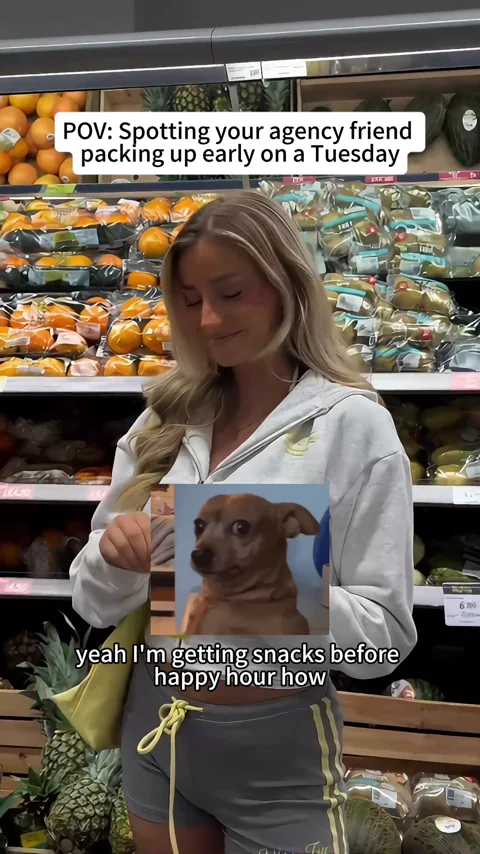
The opening text sets up the scene: “POV: Spotting your agency friend packing up early on a Tuesday.” The interviewer asks why she isn’t working. Her answer creates the surprise.
Around nine seconds, the confused-dog reaction appears as the interviewer questions how she could be finished. It punctuates that reaction without replacing the conversation.
Add the hook text and captions in your editor, where you can adjust the timing and correct each word.
Use real recordings of your app
Record the exact flow you’re explaining, rather than asking the video model to invent your product interface. Here are the recordings used to illustrate the PostPlus workflow.
Preview the meme and sound assets
The two reaction images appear in the edit above. Use short sounds to support a reaction, and keep the spoken words easy to hear.
Watch it once with sound, once without
With sound, check that each reply starts at the right moment and the effects don’t cover the dialogue. Without sound, check that the captions explain the conversation and the screen recordings remain readable on a phone.
Export an MP4 in the aspect ratio you’re using for the ad. This case uses a vertical 9:16 composition.
6. Take the finished video
into Meta Ads Manager.
PostPlus can help with this step too. Connect your Meta Ads account in PostPlus, attach the finished MP4 in Claude or ChatGPT, and ask AI to upload the video and prepare the ad copy for your app.
Give it the account you want to use, your destination page, audience, and goal. Ask it to confirm the video is ready to use, then review the suggested primary text, headline, and CTA together.
Ask PostPlus to prepare the ad
If PostPlus is not available in this chat yet, first help me connect it in Claude or ChatGPT using the setup instructions at https://postplus.io/formats/street-interview#connect-postplus and the connector URL https://mcp.postplus.io/mcp. Once it is available, continue with the task below.

Help me prepare this finished street interview video for Meta ads. @PostPlus

If my Meta Ads account is not connected to PostPlus yet, help me connect it first.
Use this ad account: [account name or ID].
My app: [app name and what it does].
Destination page: [URL].
Audience: [who this ad is for].
Goal: [the action I want people to take].

Upload the attached MP4 to this ad account and confirm when the video has finished processing and is ready to use.

Based on the video's opening question and product explanation, write three primary text options, three headlines, and a suitable CTA. Keep the copy consistent with my destination page and the product facts in this chat.

Show me the uploaded video's details and the suggested copy so I can finish the ad in Meta Ads Manager. Don't turn on delivery or change any budgets.
Finish and check it in Ads Manager
At the ad level, use the uploaded video and the copy you chose. You can also upload the MP4 manually here.
- Add the video.
Create or edit an ad, choose a single image or video format, and select the video PostPlus uploaded. If you’re uploading it yourself, add the MP4 in the ad creative media section.
- Connect the conversation to the destination.
Add the primary text, headline, destination URL, and CTA. If the video promises to show how your app solves a problem, send people to the page that explains that same use case.
- Check each placement preview.
Look at the captions, product recording, and final URL in Feed, Stories, and Reels previews. Adjust any crop that hides the person, the demo, or the closing action.
- Use it to learn which message works.
For the next version, change one clear thing, such as the opening question. Keep track of the version so you can connect campaign results to the actual creative.
For your app, replace the PostPlus example with your own problem, product demo, and destination. The same steps take you from a reference to a finished creative you can test.
Make your first one.
Connect PostPlus.
You can follow this workflow in Claude or ChatGPT. Connect PostPlus, start a new chat, and paste the reference-analysis prompt from this guide.
Add PostPlus in Claude
Use the browser connection, or follow the manual setup for Claude Desktop. Sign in to PostPlus when prompted.